📈 SEO & Marketing
July 17, 2025
7 min read
Open Graph (OG) Tags: Your Last Defense Against AI Scrapers
F
Footprint Team
Social Architecture
Table of Contents
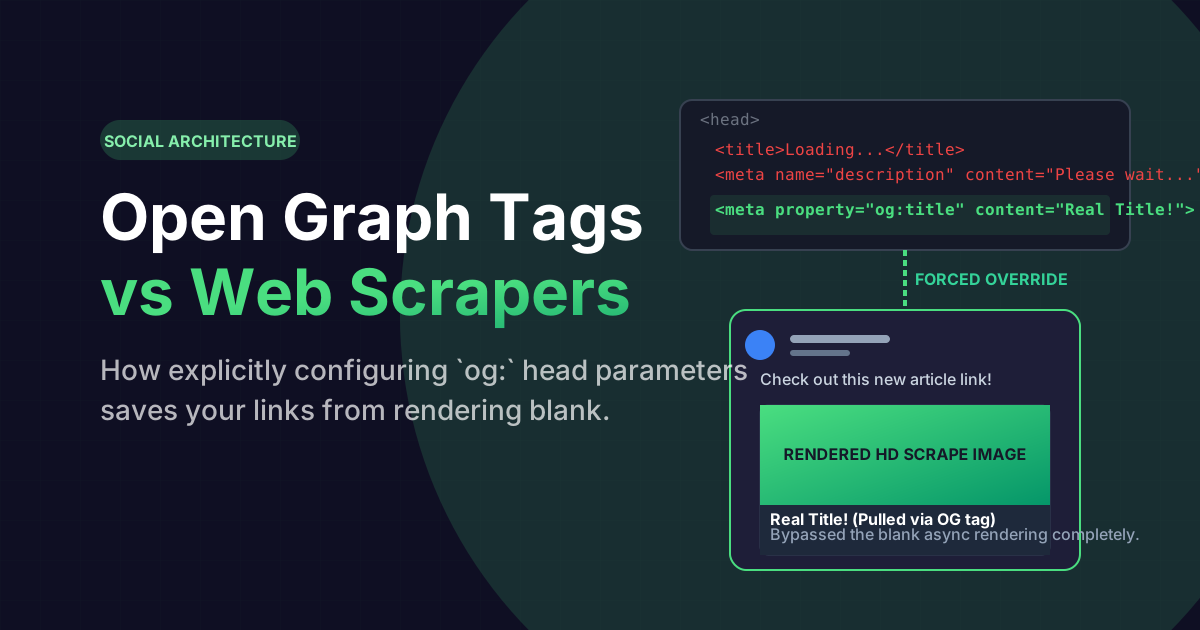
When a user copies your website URL and pastes it into LinkedIn, iMessage, Discord, or X (Twitter), the platform's backend servers immediately trigger a headless scraping bot. The bot visually scans your website at lightning speed, desperately hunting for an image and a title to render as an interactive preview card.
If you have not explicitly hardcoded the underlying HTML head metrics, you are entirely at the mercy of a random AI algorithm wildly guessing which paragraph on your site is the actual description, frequently resulting in a horribly cropped logo and broken layout strings.
The Algorithmic Scraping Chaos
Search bots historically assumed that your HTML `
` and `<p>` paragraph text accurately represented the article. But modern JavaScript-heavy React sites utilize asynchronous loading, meaning the scraper frequently just hits an empty loading DOM element and renders absolutely nothing but a terrifying gray blank block on Facebook.</p>
<p>This profoundly destroys your Click-Through Rate (CTR). Users physically refuse to click on blank gray hyperlinks. They demand massive, high-contrast, edge-to-edge billboard images dynamically confirming site legitimacy before interacting.</p>
<div class="article-card">
<h3 style="margin-top:0">Visually Preview Your Graph Tags</h3>
<p style="margin-bottom:0">Do not guess how your React site will render inside a Discord chatroom or a Facebook timeline. Physically validate the exact pixel mapping of your generated OG Tags before launching to production.</p>
<a href="/tools/seo/og-preview.html" class="cta-button">
Launch Live Open Graph Preview SDK
<svg width="20" height="20" viewBox="0 0 24 24" fill="none" stroke="currentColor" stroke-width="2"><path d="M5 12h14M12 5l7 7-7 7"/></svg>
</a>
</div>
<div class="ad-slot" data-ad-slot="blog-mid"></div>
<h2 id="facebook-og">The Facebook Protocol Standard</h2>
<p>In 2010, Facebook recognized the chaos and launched the <strong>Open Graph Protocol (`og:`)</strong>. It aggressively bypasses algorithmic scraping guess-work by forcing the developer to explicitly label the exact canonical URL, the exact JPG image asset path, and the definitive description string in the `<head>` of the database. Today, virtually every single social platform on Earth natively honors the `og:` standard over everything else.</p>
<!-- Google tag (gtag.js) -->
<script async src="https://www.googletagmanager.com/gtag/js?id=G-GV3Y7KSWN1"></script>
<script>
window.dataLayer = window.dataLayer || [];
function gtag(){dataLayer.push(arguments);}
gtag('js', new Date());
gtag('config', 'G-GV3Y7KSWN1');
</script>
<h2 id="twitter-cards">Overriding the Twitter Card API</h2>
<p>Twitter (X) utilizes its own brutally strict legacy schema mechanism technically known as "Twitter Cards" (`twitter:card`). By globally declaring `<meta name="twitter:card" content="summary_large_image">`, you forcefully instruct the X architecture to stretch your image full-width across the mobile device container, rather than maliciously minimizing it into a tiny thumbnail sidebar.</p>
<h2 id="faq" class="faq-section">Frequently Asked Questions</h2>
<div class="faq-list">
<div class="faq-item">
<button class="faq-question">
What is the perfect OG image size?
<svg class="faq-icon" width="20" height="20" viewBox="0 0 24 24" fill="none" stroke="currentColor" stroke-width="2"><path d="M6 9l6 6 6-6"/></svg>
</button>
<div class="faq-answer">
<p>The universal mathematical global standard is exactly <strong>1200x630 pixels</strong> structurally mapped at a 1.91:1 aspect ratio. This perfectly guarantees no algorithmic cropping occurs on desktop LinkedIn feeds or mobile iMessage bubbles.</p>
</div>
</div>
<div class="faq-item">
<button class="faq-question">
Do OG Tags natively help Google SEO?
<svg class="faq-icon" width="20" height="20" viewBox="0 0 24 24" fill="none" stroke="currentColor" stroke-width="2"><path d="M6 9l6 6 6-6"/></svg>
</button>
<div class="faq-answer">
<p>Directly? No. Google explicitly uses the standard `<title>` and `<meta name="description">` tags for the actual organic SERP algorithm. Indirectly? Yes. Massive social media click velocity through well-formatted OG cards mathematically proves authority, triggering systemic indexing prioritization.</p>
</div>
</div>
<div class="faq-item">
<button class="faq-question">
Can I test my open graph locally?
<svg class="faq-icon" width="20" height="20" viewBox="0 0 24 24" fill="none" stroke="currentColor" stroke-width="2"><path d="M6 9l6 6 6-6"/></svg>
</button>
<div class="faq-answer">
<p>Facebook scrapers strictly require physically pinging public DNS IP addresses. However, you can utilize our dedicated OG Preview Tool sandbox to locally ingest code outputs perfectly mirroring the exact timeline server logic offline.</p>
</div>
</div>
</div>
<div class="ad-slot" data-ad-slot="blog-bottom"></div>
</article>
</div>
</main>
<footer class="footer">
<div class="container">
<div class="footer-bottom">
<span>© 2025 Footprint. All rights reserved. | <a href="https://footprint.co.in/">footprint.co.in</a></span>
</div>
</div>
</footer>
</div>
<script src="/src/js/shared-nav.js"></script>
<script src="/src/js/shared-footer.js"></script>
<script src="/src/js/categories.js"></script>
<script src="/src/js/app.js"></script>
<script src="/src/js/protect.js"></script>
<script src="/src/js/adsense.js"></script>
<script src="/src/js/breadcrumbs.js"></script>
<script>
document.querySelectorAll('.faq-question').forEach(button => {
button.addEventListener('click', () => {
const item = button.closest('.faq-item');
const isActive = item.classList.contains('active');
document.querySelectorAll('.faq-item').forEach(faq => faq.classList.remove('active'));
if (!isActive) item.classList.add('active');
});
});
</script>
</body>
</html>